 Raid Alarm
How to set up a raid alarm in Rust: Smart Alarm and phone alerts
A raid alarm tells you the moment someone breaks into your base. In Rust you build it with electricity: a trigger, a power source and a Smart Alarm that sends a push notification to your phone through the Rust+ companion app.
A normal push notification is easy to sleep through, though. This guide shows the basic setup first, then how to turn the alert into a phone call that rings like an incoming call and reaches your whole team.
What you need
- A Smart Alarm placed inside your base
- A trigger that sends power to it, such as a door controller, an HBHF sensor or a turret circuit
- A power source, for example a solar panel, wind turbine or battery
- A wire tool to connect everything
- The Rust+ app, paired with your server (see how to pair Rust+ with your server)
Step 1: place the Smart Alarm and give it power
Place a Smart Alarm inside your base and connect it to a power source. A small battery is often enough for a basic alarm system. Make sure your batteries or generators can support everything you connect, because an under-powered circuit is one of the most common reasons alarms fail.
Step 2: connect a trigger
The Smart Alarm activates whenever the connected trigger sends power. Common triggers are door controllers, heartbeat sensors, turret circuits or your own electrical logic.
- Sensors work best near entrances, breach points, external walls or compound gates.
- Adjust the sensor settings so your own teammates do not set it off all day.
- An Auto Turret covering likely approaches can also drive the alarm, together with sirens or lights.
Step 3: pair the Smart Alarm with Rust+
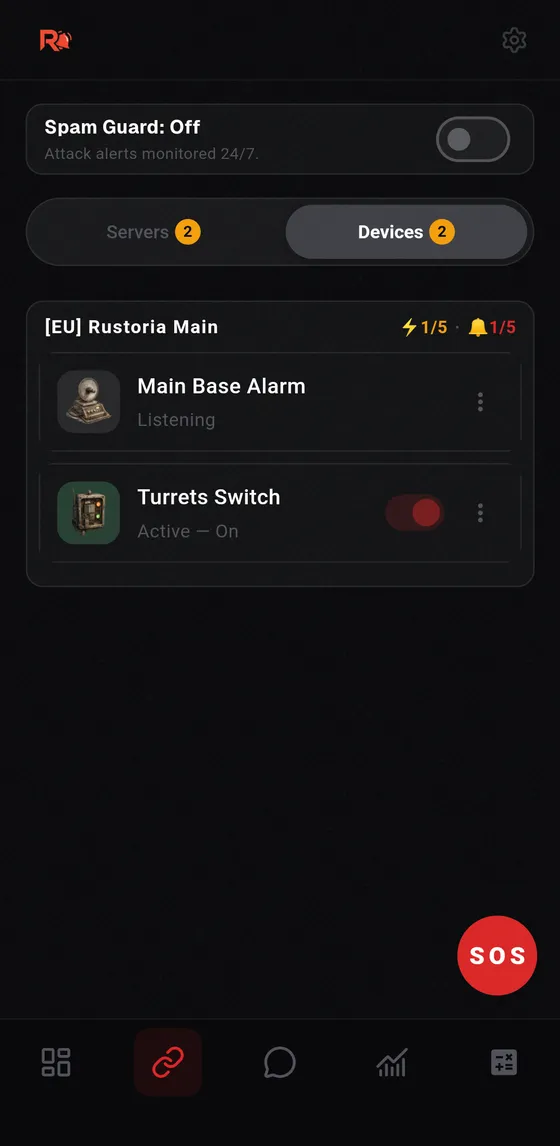
Once the Smart Alarm is paired with Rust+, it sends a customizable push notification to your phone whenever an electrical signal is detected. You can write your own notification message, so use something you will recognize at 4 a.m.
Make sure notifications are enabled for the Rust+ app in your phone settings.
Step 4: test it
Trigger the sensor on purpose and check that the notification appears on your phone. Test again after any change to the wiring. A raid alarm you never tested is a raid alarm you cannot trust.
Step 5: turn the alert into a real call
A push notification is easy to miss when you are asleep or away from your phone. Raid Alarm is an unofficial companion app that rings your phone like a real incoming call the moment your base is attacked, and does the same for every teammate who signs in with their own Steam account.
Your teammates install the app on their own phones and sign in with Steam inside Raid Alarm. The server pairing completes automatically. For the call to ring loudly, your phone must not be on silent and Do Not Disturb must be off, or the app must be allowed in your Do Not Disturb exceptions.
Common mistakes
- Never testing the circuit after building it
- Not enough power for everything you connected
- Sensors placed so close to your own areas that they trigger constantly
- Notifications disabled, or background notifications blocked on the phone