 Raid Alarm
How to find the best Rust server for you (PC)
Search for the best Rust server and you get a hundred lists that disagree. They disagree because the best server depends on how you play. A solo player who wants quiet nights and a clan that wants constant fights need different servers.
So instead of another ranked list, here is how to choose. Ask five questions, then use a server browser to filter. It takes five minutes and it saves you the worst thing in Rust: building for hours on a server that does not fit you.
1. Official or community server?
Official servers are run by Facepunch and follow the default rules with a monthly wipe. They are a good baseline if you want the game as designed. Community servers add everything else: different wipe schedules, rates, group limits, plugins and rules. Most players end up on community servers because of the variety.
2. Vanilla or modded?
- Vanilla: the standard rules with little or no change. Easy to understand, and what most guides assume.
- Modded: plugins add kits, teleports, shops, events or protection systems. Good for a faster pace, but rules vary widely, so read them.
- Rate servers (2x, 5x, 10x and up): faster gathering and crafting. Great for short wipes and for players with limited time. Look for the multiplier in the server name or description.
3. PvP or PvE?
PvP is the classic Rust experience. PvE servers limit or remove player damage, so you build and survive without being raided. Both have real fans, and the difference is big enough to get its own guide: Rust PvE vs PvP servers.
4. Group limit
Servers cap how many players can team up: solo only, duo, trio, quad or no limit. A solo or duo server is the fairest place to learn, because clans with ten players are not allowed. If you play with friends, choose a limit that fits your group, because breaking it can get you banned.
5. Wipe schedule, population and ping
- Wipe schedule: weekly and bi-weekly servers reset often, so you start fresh more times. Monthly servers let bases grow big. Check the next wipe before you commit. The wipe countdown shows the global one.
- Population: a lot of players is more action. A moderate population often means calmer nights. Very low numbers mean an empty map.
- Ping: pick a server in your region. High latency makes fights frustrating even on a great server.
Shortlist, then test
- Use the in-game server list with its filters, or a third-party tracker such as BattleMetrics, to see player counts and history.
- Pick three servers that match your answers above.
- Join one early in its wipe cycle, so you can judge it before you invest.
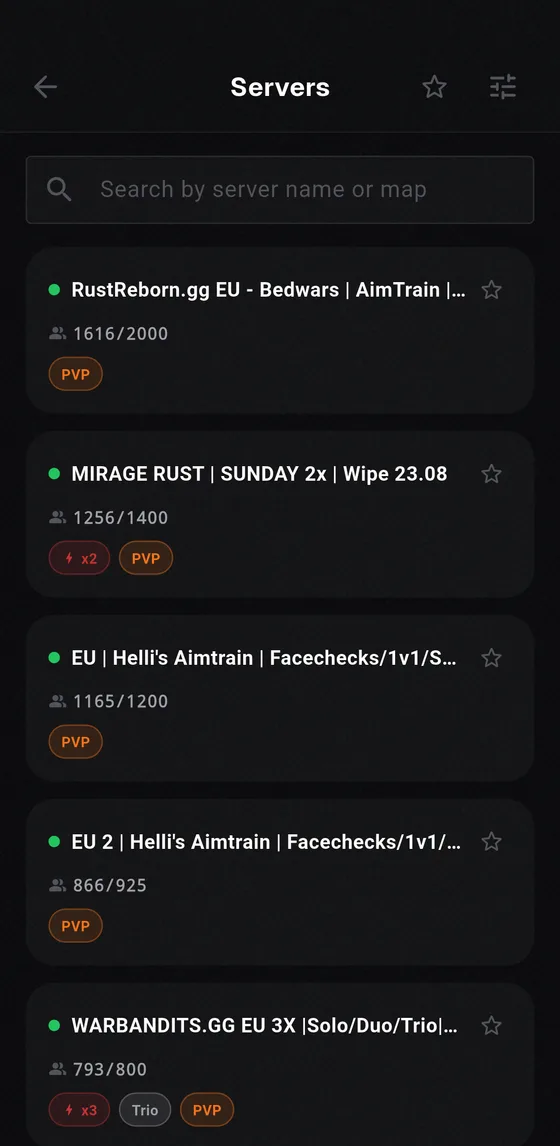
- Favorite the ones you like. Raid Alarm has a server browser with favorites and a live wipe countdown, so you can see when your servers reset without opening the game.
Frequently asked questions
What is the best Rust server?
There is no single best server. It depends on whether you play solo or in a group, prefer PvP or PvE, and want vanilla or modded rules. Compare group limit, rates, wipe schedule, population and ping.
Are modded Rust servers better than vanilla?
Not better, just different. Modded servers add kits, shops and events and often run faster. Vanilla keeps the standard rules. Choose by how much time you have and how you like to play.
How do I find Rust servers with a low population?
Filter the server list by player count, or use a tracker like BattleMetrics. Smaller servers are quieter, which suits solo players and beginners.
Can I check wipe times for my servers on my phone?
Yes. Favorite servers in Raid Alarm and follow the live countdown to the next wipe from your phone.